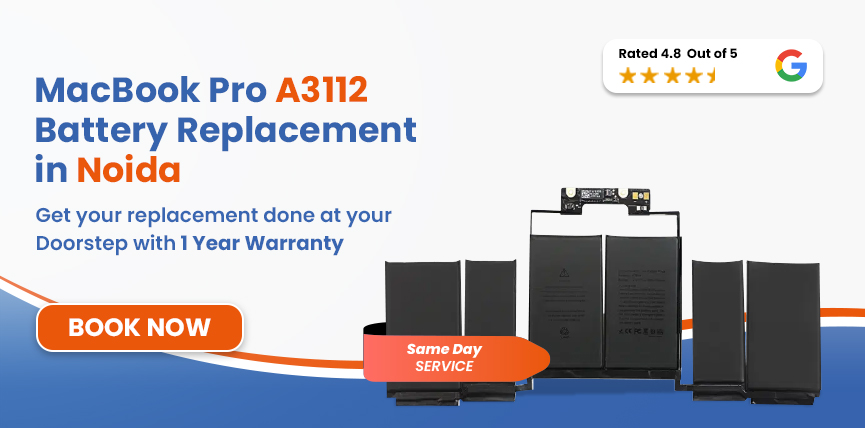

 4.8/ 5
40,000+
Happy Customers
The 14-inch MacBook Pro M4 is built to keep up with your whole day. But lately it shuts off halfway through a task, the battery is flat by mid-afternoon, and the percentage drops faster than you can finish a coffee. When that starts happening, there could be an underlying problem with the battery.
Lappy Maker offers MacBook Pro A3112 battery replacement in Noida without sending you across the city. We don't have a centre in Noida, so our agent collects the laptop from your home or office for free; our technicians repair it at our Nehru Place or Gurgaon centre, and it comes back to your door. You get certified technicians, OEM-grade parts, and up to a 1-year warranty from a team with 40,000+ customers and a 4.8-star rating.



Check your model before a battery is ordered. The A3112 has close siblings in the 14-inch range that look nearly identical from the outside but can use different battery part numbers.
| MacBook Pro A3112 - Battery Specifications | |
|---|---|
| Specification | Detail |
| Full Model Name | MacBook Pro 14-inch (M4, Late 2024) |
| Model Identifier | Mac16,1 |
| EMC | 8623 |
| Battery Model | Confirmed at diagnosis |
| Cell Chemistry | Lithium-Polymer (Li-Po) |
| Capacity | 72.4 Wh |
| Voltage | 11.58V |
| Cell Count | 6-cells |
| Rated Charge Cycles | 1,000 |
| Estimated Battery Life | Up to 24 hours |
| Charging | MagSafe 3, 70W included |
To confirm, open Apple Menu → About This Mac.
It only takes a minute, and it gives our technicians a useful starting point before the laptop even reaches them.
On the 14-inch M4, battery trouble creeps in slowly and then becomes hard to ignore. These are the signs to watch for:
Safety Hazard: A swollen battery pushes straight against the trackpad assembly and sits close to the logic board. In a space this tight, any physical change needs attention right away. Stop using the laptop and call us to book a free pickup.
The A3112 is a late 2024 machine, so age alone usually isn't the cause. These are the conditions and habits that wear batteries out early.
With summers in Noida reaching 40–42°C, the battery has no cooling path of its own inside the laptop. Months of that heat speed up chemical ageing.
The M4 is so efficient that people push it hard all day, and that means more charge cycles than a light user would rack up.
Sitting at 100% for long stretches, or running close to zero, stresses the cells slowly and silently over months.
The A3112 ships with a 70W MagSafe 3 adapter tuned to its charging profile. Fake or mismatched adapters can't copy that, so the cells wear faster.
The A3112 uses a lithium-polymer battery held in place by adhesive beneath the trackpad. Careful handling matters at every stage.
As soon as your laptop reaches our centre, we run a full software and hardware diagnostic that covers cycle count, maximum capacity and charging circuit integrity, among other checks.
Before choosing an OEM battery, we confirm the model identifier (A3112), EMC number (8623), system identifier (Mac16,1) and battery part number on the unit itself.
With the model confirmed, we pick an OEM battery matched to the exact capacity of 72.4Wh. A battery that doesn't match gives wrong health readings and disrupts charge management.
Our team removes the base cover and releases the adhesive strips. The new battery goes in beside the trackpad, is seated and connected, and the chassis is closed up again.
After fitting, we run a complete charge cycle, confirm the condition reads Normal, test MagSafe charging speed, and watch thermal behaviour under load.
We finish by testing the whole machine: battery health, trackpad, keyboard, all three Thunderbolt ports, the MagSafe connector and chassis alignment. When everything passes, it's delivered back to your door in Noida.
Services
Free Pickup & Drop
Expert Technicians
Up to 1 Year Warranty
No fix No fee
Affordable
OEM Quality Spares
Same Day Service
Dedicated Support
Free Diagnosis
Authorised Service
Center


Local
Shop
Lappy Maker
Service
The 14-inch M4 is a late 2024 model, so parts availability at the time you book can affect the price. If our diagnostic finds anything beyond the battery, we tell you before going any further. The estimated cost for MacBook Pro A3112 battery replacement in Noida is ₹10,999–₹20,000.
Estimated Cost — A3112 & Related MacBook Pro 14-inch Models
| Model | Chip | Year | Battery | Est. Replacement Cost |
|---|---|---|---|---|
| A3112 | M4 | Late 2024 | 72.4Wh | ₹10,999 – ₹20,000 |
| A3401 | M4 Pro | Late 2024 | 72.4Wh | ₹10,000 – ₹21,000 |
| A3185 | M4 Max | Late 2024 | 72.4Wh | ₹10,999 – ₹20,000 |
| A2992 | M3 Pro / M3 Max | Late 2023 | 72.6Wh | ₹9,999 – ₹19,000 |
All figures are starting estimates. The final cost is confirmed in writing after diagnosis, and it includes the battery, fitting, full testing and up to a 1-year warranty.
Over 40,000 customers have trusted us with their MacBooks and laptops - solidified by our unique offerings:
You don't need to travel. Our agent collects the MacBook from your door and returns it once the repair is done, and the whole of Delhi NCR is covered.
Every battery is checked against your model's specifications. We never fit generic aftermarket packs that macOS can't read properly, and the part that goes in has to behave like the original.
Our technicians have years of hands-on experience, and the 14-inch MacBook Pro chassis is familiar ground. Most replacements are done within a few hours, depending on parts availability.
If we can't diagnose and fully resolve the problem, you pay nothing at all. That's our firm guarantee.
Because we're independent and use in-house technicians, we can charge much less without any trade-off in parts quality or process.
A worn battery doesn't stay at one level. With every charge cycle, the gap grows between what the machine can do and what it actually delivers. macOS responds by holding the M4 chip back, and a laptop built for fast, responsive work starts to feel ordinary.
Swelling is a separate problem, and it can't wait. There's very little room inside the 14-inch chassis for a battery under pressure. An expanding cell can reach both the logic board and the trackpad assembly, and damage to either turns a battery swap into a much bigger and costlier repair.
No habit can stop a battery from ageing, but these five will help the new one last longer.
You don't need to come to us. Our free doorstep pickup and delivery covers your home or office anywhere in Noida. Our agent collects the MacBook, the repair is carried out at our Nehru Place or Gurgaon centre, and the laptop returns to your door once it has passed every quality check.
Most battery replacements are finished the same day, subject to parts availability. You can book a slot by calling us on +919319848444. Or if you'd rather bring it yourself, you can visit our physical location at Nehru Place or Gurgaon centre. We're open Monday to Saturday, 10 AM to 8 PM.
The 14-inch MacBook Pro M4 is among the newest in Apple's Pro lineup and has plenty of life left in it. A battery that can't keep up with the chip is the one thing between you and the performance the hardware was built for.
Whether it's a "Service Recommended" alert or shutdowns that interrupt your day, MacBook Pro A3112 battery replacement in Noida at Lappy Maker is the simple fix, and we handle the travel. You get a written quote after every diagnosis, up to a 1-year warranty on the repair, and no charge if we can't fix it. Call 9319848444 or message us on WhatsApp to get started.
Also worth a look:




I had a awesome experience of repairing my MacBook from Lappy Makers, All and the comfort of sitting at my office. They gave pick and drop service and sameer was courtious and prompt in replying all my queries and deliver a great service experience. Thank you soo much Lappy Makers


It was a wonderful experience getting my MacBook screen repair at Lappy maker. They are very professional when it comes to service. I was pleasantly surprised by their thorough knowledge of the product. They are honest and eager to help out. And I am happy I found an excellent place to get my Apple MacBook fixed at a competitive price and with quality work. I wish them all the best in their endeavors.

Awesome experience, genuine Mac repair service, really helpful staff , they are so ground to earth and polite when they speak and discuss the issue. They will explain everything and even the price is genuine. Overall I really recommend to anyone who wants to repair the MacBook - 5 star rated

We were struggling to MacBook issue, after visiting other repairing store but luckly found Lappy Maker. Now our Mac is completely fine! Thanks!

My Macbook Air was having frequent screen issue. I called these guys up and the engineer was at my place immediately. Took 3 days to figure out the problem of a power circuit which needed to get redone.I was sceptical initially as the costing was coming too much which was very close to the value of laptop. However Mr. Santosh who was the engineer repairing the MacBook had a great attitude of never giving up. My Laptop is working fine again and hopefully it would remain like this for some time. I'm happy with the entire experience and pricing. Would recommend to consult them for all mac laptop related problems.

Yes, you can. You can contact our team and arrange for a pickup and drop-off from anywhere in Noida. It would then be signed and taken for a proper diagnosis and replacement.
The estimate is ₹10,999–₹20,000, covering the OEM battery, fitting, testing and up to a 1-year warranty. The confirmed price is given in writing after diagnosis.
It uses a 72.4Wh, 11.58V, 6-cell lithium-polymer battery rated for 1,000 charge cycles. We confirm the exact part number on your unit at diagnosis.
Go to Apple Menu → System Settings → Battery and click (i) next to Battery Health. For cycle count and full details, open Apple Menu → About This Mac → System Report → Power.
If we can't resolve the battery issue on your MacBook Pro A3112, nothing is charged. There's no diagnostic fee, no handling cost and no pickup or delivery charge.
Yes. Eligible Lappy Maker battery replacements carry up to a 1-year warranty covering the part and the fitting.
Most jobs are finished the same day, subject to parts availability. The replacement itself takes about one to two hours once the diagnostic is done and the replacement battery is confirmed.
No. Replacing the battery doesn't involve the SSD or your stored files, and everything stays as you left it. A recent backup before any hardware work is still good practice.
If your A3112 is still within Apple's one-year limited warranty or covered by AppleCare+, check that coverage first. Outside it, independent repair adds no risk beyond the repair itself, and we back every eligible repair with our own up to 1-year warranty.

4.8/
40,000+
Happy Customers

Visit Within
One Hour

On Time
Delivery

Best Customer
Support


Disclaimer : The information on www.lappymaker.com is provided for general informational purposes only. Repair costs, timelines, and service availability may vary based on the device model and the extent of damage after inspection. Lappy Maker is an independent laptop and MacBook repair service provider and is not affiliated with or authorized by Apple Inc. or any other laptop manufacturer.